A Starknet Shadow Account is a public keyless contract address that can execute anything a normal account can. The difference? Nobody can see the link with the user’s wallet or who owns it.
Shadow Accounts are part of STRK20, Starknet’s privacy framework. They let any Starknet app offer a private mode: you switch from Public to Private, and your lending, liquidity, vault positions, and practically any DeFi activity are no longer tied to your main wallet.
Why weren’t DeFi positions private before?
On a public blockchain, your wallet address is your identity. Your balance, your trades and every position you open are published for anyone to read, and they all point back to the same address.
STRK20 already made private payments and private swaps possible on Starknet. A swap is a single action: tokens leave the privacy pool, get swapped, and come straight back in the same transaction, so nothing is left outside the pool.
Most of DeFi doesn’t work in a single action. A loan, a liquidity position or a vault deposit has to stay open. Until now, that meant using a public address and disclosing your positions. Shadow Accounts give each of those positions its own address with no public link to you.
How do Shadow Accounts work?
Your funds stay private in the STRK20 privacy pool. In public apps, anyone can see your positions. A Shadow Account lets you use those apps without linking anything to your public address. Only your wallet knows the Shadow Account is yours.
You can open as many shadow accounts as you need: one for each app, or even one for each position inside an app. Spreading your activity across several Shadow Accounts gives you more privacy than a single unlinkable account, because nobody can group your positions together.
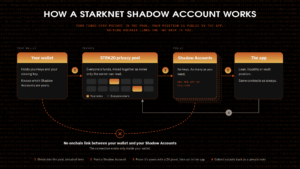
The privacy pool and notes
The STRK20 privacy pool holds everyone’s funds, mixed together. When you deposit into it, your funds become notes. A note records three things: who owns it, which token it holds, and how much. Only you can spend your notes, and only your viewing key can read them.
When you spend a note, the pool checks a proof that you followed the rules and that the note is yours. It learns nothing else about you.
The Shadow Account itself
A Shadow Account is an address made for you and for one app. Your wallet works it out from three inputs: you, the app’s name, and a number. The app recognises it when you return, without seeing your viewing key.
Shadow Accounts have no keys, so they can’t sign anything on their own. Instead, you generate a zero-knowledge proof that you own the Shadow Account, and one shared contract, the ShadowAccountAnonymizer, acts through it for you. A Shadow Account is deployed only when you use it, so it can receive funds before it even exists onchain.
What is private, and what is public?
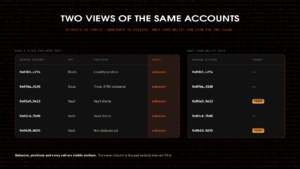
Shadow Accounts keep ownership private, not activity. A block explorer shows every Shadow Account interacting with public applications. What it cannot show is which wallet the account belongs to.
How do Shadow Accounts improve on app-specific anonymizers?
Use an app-specific anonymizer for a one-off action like a swap. Use a Shadow Account for any public position that has to stay open whilst maintaining privacy.
| Shadow Account | App-specific anonymizer | |
|---|---|---|
| State | Persists across transactions | Stateless, one transaction |
| Holds positions | Yes, as many per app as you need | No long-lived positions |
| Custom Cairo | None: one shared contract | Yes, plus review or audit |
| Fits | Vaults, LPs, loans, staking | Swaps, one-shot actions |
| Trade-off | Control is indirect | Narrow, fixed actions |
“Control is indirect” means you prove you own the Shadow Account with a zero-knowledge proof and the anonymizer acts for you, because the Shadow Account has no keys to sign with.
How do developers add Shadow Accounts to an app?
Your contracts do not change. Shadow Accounts run through one shared contract, the ShadowAccountAnonymizer, so you don’t write or deploy new Cairo, and your liquidity stays where it is. Adding a private mode is mostly front-end work: your app asks the user’s wallet for their Shadow Account, then sends its usual calls through it.
Where to start:
- STRK20 by Example: Shadow Accounts explains how Shadow Accounts work and walks through the full integration flow.
- The starknet.js WalletAccount guide covers the wallet methods your front end calls, and the starknet.js, Wallet API and wallet versions you need.
- The Shadow Vault mainnet demo is a working app built on a Vesu vault. It’s an educational example, not audited production code.